No time to debug this Vercel issue? Tell us what's broken and our developers will get it working, usually within 24 hours.
The Problem
If Next.js throws Invalid src prop on next/image, hostname "X" is not configured under images in your next.config.js, it means you're loading an external image whose domain hasn't been allowlisted. Add that hostname to images.remotePatterns in next.config.js and the error goes away.
Why It Happens
The next/image component optimizes and serves images through a built-in loader for performance and security. To prevent arbitrary external URLs from being proxied through your server, Next.js requires you to explicitly allowlist every hostname you load images from outside your own domain.
This error commonly shows up when:
- You add a new image source (CDN, CMS, Unsplash, S3 bucket, etc.) without updating
next.config.js. - You migrated from the older
domainsarray toremotePatternsand missed a host. - The hostname in your code doesn't exactly match what's configured (subdomain mismatch,
httpvshttps). - You edited
next.config.jsbut never restarted the dev server.
The Fix
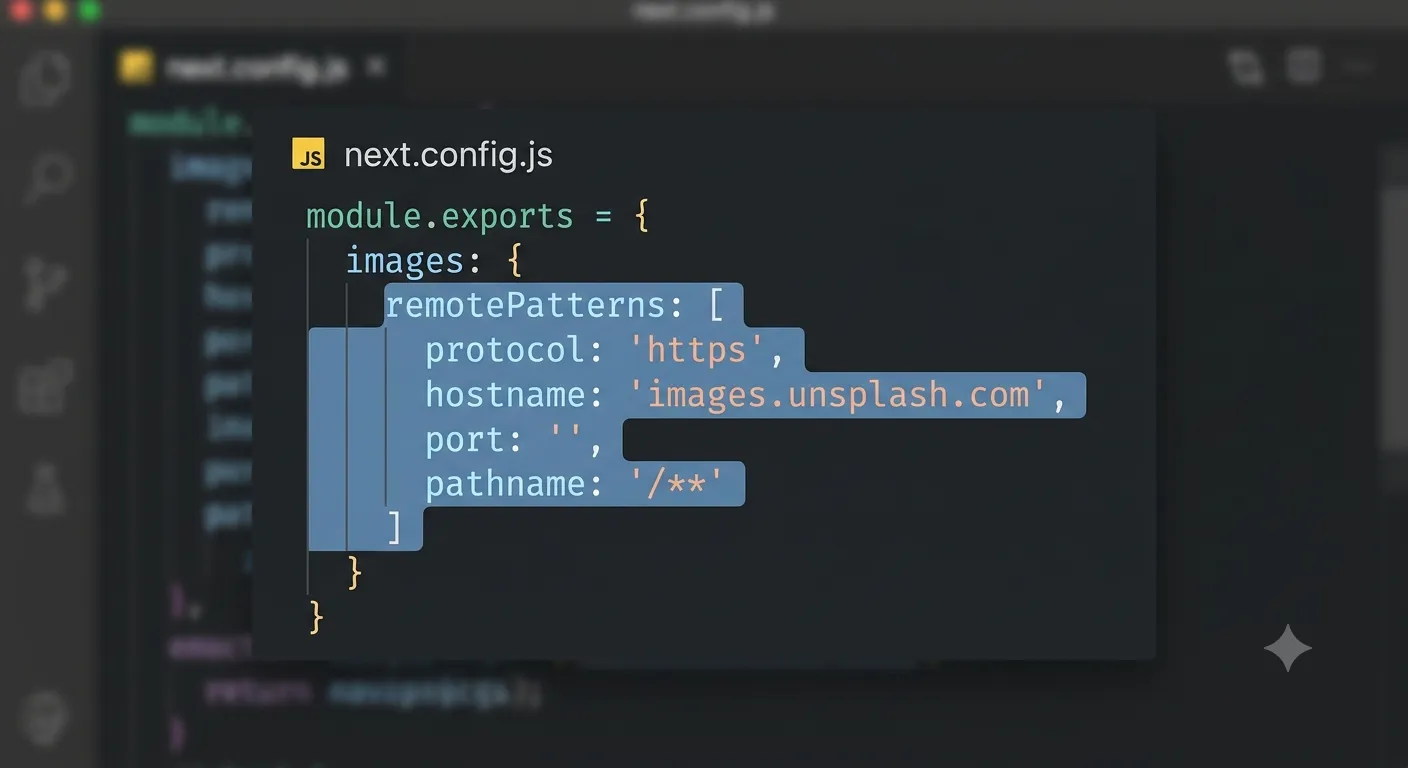
1. Add the hostname to images.remotePatterns
remotePatterns is the modern, more precise way to allowlist external image sources, since it lets you control protocol, hostname, port, and path.
module.exports = {
  images: {
    remotePatterns: [
      {
        protocol: 'https',
        hostname: 'images.unsplash.com',
        port: '',
        pathname: '/**',
      },
    ],
  },
};
Update hostname to match the exact domain shown in your error message.
2. Or use the simpler domains array (legacy)
For quick fixes, the older domains array still works but offers less control:
module.exports = {
  images: {
    domains: ['images.unsplash.com'],
  },
};
Prefer remotePatterns for new projects, it's the approach Next.js recommends going forward.
3. Restart and redeploy
next.config.js changes are only picked up on server start:
npm run dev
If the error only appears in production, push your change and trigger a fresh deploy so the updated config is built into the deployment.
How to Prevent It
- Keep a running list of every external image domain your app uses and check it into
next.config.jsas you add new ones. - Prefer
remotePatternsoverdomainsfor tighter, more explicit control. - Add a code review checklist item: "new image source added? update next.config.js."
- Test image-heavy pages against a fresh
next buildbefore merging, not justnext dev.
Frequently Asked Questions
What does "hostname is not configured" mean in Next.js?It means the external domain you're loading an image from with next/image isn't listed in images.remotePatterns (or images.domains) in your next.config.js.
domains only lets you allowlist a hostname. remotePatterns lets you also control protocol, port, and path, giving you more precise and secure control over which images can be optimized.
Do I need to redeploy after changing next.config.js?
Yes. Config changes are baked in at build time, so you need to restart your dev server locally and redeploy to production for the fix to take effect.
Can I allow all external image hostnames?Technically yes with a wildcard pattern, but it's discouraged since it defeats the security purpose of the allowlist. Explicitly listing known hostnames is safer.
Need Help?
Image configuration errors are quick to fix once you know where to look. Explore our development services or get in touch if you want help auditing your Next.js image pipeline.
Fixed it? Check the rest of your Vercel app for free. Our App Checker scans for exposed API keys, public Supabase service keys, SEO problems and slow loading in about 30 seconds.
Related Services
Bug Fix Service
Still stuck? We'll fix your Vercel error for you.
Skip the hours of trial and error. Send us the error and access to your project, and a senior developer will get it working, usually within 24 hours. We'll review it for free before any work starts.
- Your bug or error fixed by a senior developer
- Most fixes delivered within 24 hours
- Short write-up of the root cause and what changed
- Free assessment before any work starts